跳过主要内容

GitHub 根本原因分析

使用 Cline CLI 自动分析 GitHub issue。此脚本利用 Cline 的自主 AI 功能来获取、分析和识别 GitHub issue 的根本原因,输出清晰、可解析的结果,可轻松集成到您的开发工作流程中。
Cline CLI 新手? 此示例假定您已完成安装指南并使用 cline auth 进行了身份验证。如果您尚未设置 Cline CLI,请先从那里开始。
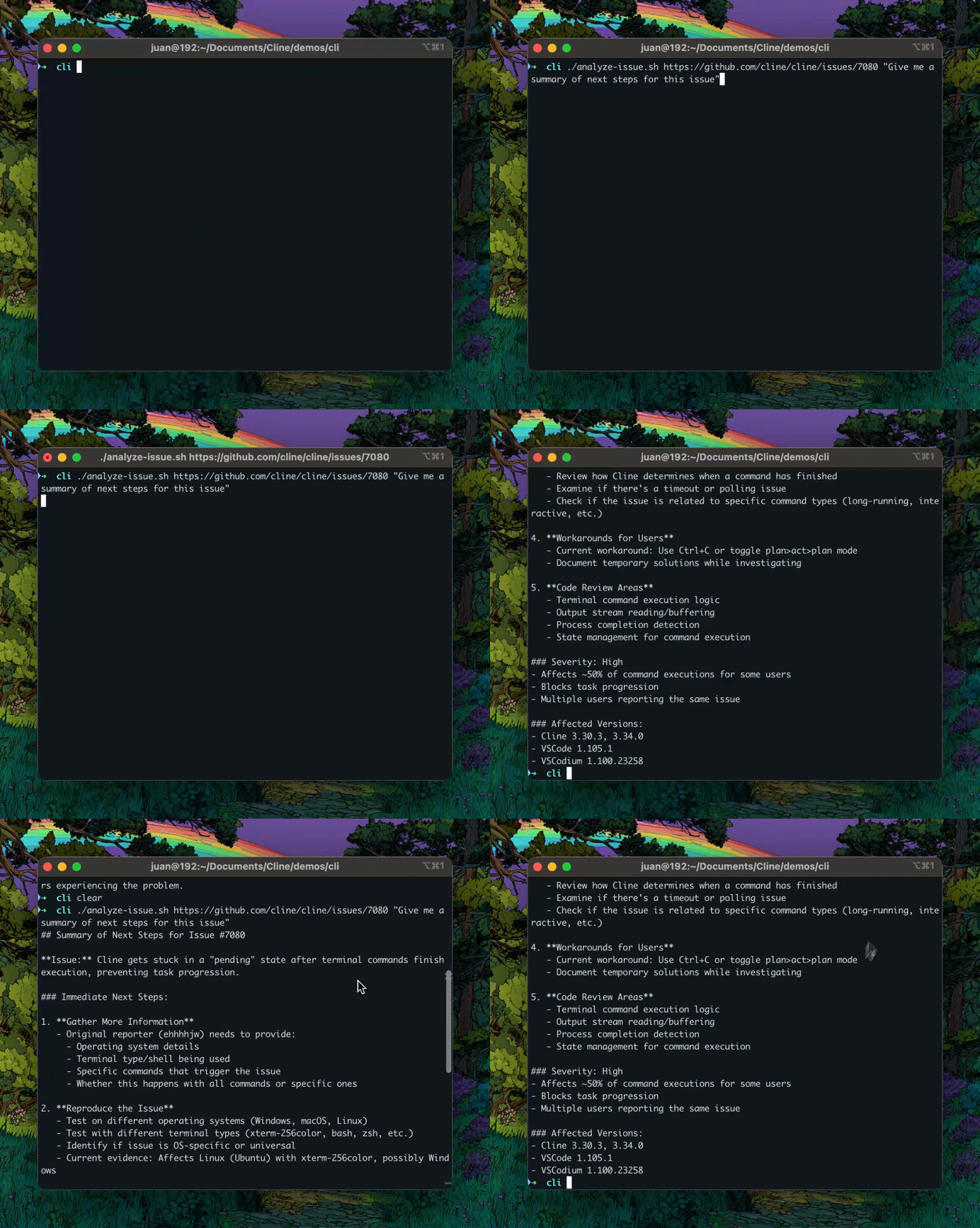
CLI Root Cause Analysis Demo

先决条件

此示例假定您已具备
  • 已安装并验证了 Cline CLI安装指南
  • 至少配置了一个 AI 模型提供商(例如 OpenRouter、Anthropic、OpenAI)
  • 对 Cline CLI 命令有基本了解
此外,您还需要
  • 已安装并验证了 GitHub CLI (gh)
  • 已安装用于 JSON 解析的 jq
  • bash shell(或兼容 shell)

安装说明

macOS

这些说明要求安装 Homebrew。如果您没有 Homebrew,请首先运行以下命令安装它
/bin/bash -c "$(curl -fsSL https://raw.githubusercontent.com/Homebrew/install/HEAD/install.sh)"
# Install GitHub CLI
brew install gh

# Install jq
brew install jq

# Authenticate with GitHub
gh auth login

Linux

# Install GitHub CLI (Debian/Ubuntu)
sudo apt install gh

# Or for other Linux distributions, see: https://cli.githubdocs.cn/manual/installation

# Install jq (Debian/Ubuntu)
sudo apt install jq

# Authenticate with GitHub
gh auth login

获取脚本

选项 1:使用 curl 直接下载
curl -O https://raw.githubusercontent.com/cline/cline/main/src/samples/cli/github-issue-rca/analyze-issue.sh
选项 2:复制完整脚本
#!/bin/bash
# Analyze a GitHub issue using Cline CLI

if [ -z "$1" ]; then
    echo "Usage: $0 <github-issue-url> [prompt] [address]"
    echo "Example: $0 https://github.com/owner/repo/issues/123"
    echo "Example: $0 https://github.com/owner/repo/issues/123 'What is the root cause of this issue?'"
    echo "Example: $0 https://github.com/owner/repo/issues/123 'What is the root cause of this issue?' 127.0.0.1:46529"
    exit 1
fi

# Gather the args
ISSUE_URL="$1"
PROMPT="${2:-What is the root cause of this issue?}"
if [ -n "$3" ]; then
    ADDRESS="--address $3"
fi

# Ask Cline for its analysis, showing only the summary
cline -y "$PROMPT: $ISSUE_URL" --mode act $ADDRESS -F json | \
    sed -n '/^{/,$p' | \
    jq -r 'select(.say == "completion_result") | .text' | \
    sed 's/\\n/\n/g'
下载或创建脚本后,运行以下命令使其可执行
chmod +x analyze-issue.sh

快速使用示例

基本用法

在保存脚本的目录中运行此命令,以使用默认的根本原因提示分析 issue
./analyze-issue.sh https://github.com/owner/repo/issues/123
这将
  • 从存储库中获取 issue #123
  • 分析 issue 以识别根本原因
  • 提供包含建议的详细分析

自定义分析提示

询问有关 issue 的具体问题
./analyze-issue.sh https://github.com/owner/repo/issues/456 "What is the security impact?"

使用特定的 Cline 实例

按地址定位特定的 Cline 实例
./analyze-issue.sh https://github.com/owner/repo/issues/123 \
    "What is the root cause of this issue?" \
    127.0.0.1:46529
这在以下情况下很有用
  • 运行多个 Cline 实例
  • 使用远程 Cline 服务器
  • 使用特定配置进行测试
该脚本将自动处理所有事情:获取 issue、使用 Cline 进行分析以及显示结果。分析通常需要 30-60 秒,具体取决于 issue 的复杂程度。

工作原理

让我们分析脚本的每个组成部分,以了解其工作原理。

参数验证

脚本验证输入并提供使用说明
if [ -z "$1" ]; then
    echo "Usage: $0 <github-issue-url> [prompt] [address]"
    echo "Example: $0 https://github.com/owner/repo/issues/123"
    echo "Example: $0 https://github.com/owner/repo/issues/123 'What is the root cause?'"
    echo "Example: $0 https://github.com/owner/repo/issues/123 'Analyze security impact' 127.0.0.1:46529"
    exit 1
fi
要点
  • 验证必需的 GitHub issue URL
  • 显示清晰的使用示例
  • 支持可选的自定义提示
  • 支持可选的 Cline 实例地址

参数解析

脚本提取并设置参数
# Gather the args
ISSUE_URL="$1"
PROMPT="${2:-What is the root cause of this issue?}"
if [ -n "$3" ]; then
    ADDRESS="--address $3"
fi
解释
  • ISSUE_URL="$1" - 第一个参数始终是 issue URL
  • PROMPT="${2:-...}" - 第二个参数是可选的,默认为根本原因分析
  • ADDRESS - 第三个参数是可选的,仅在提供时设置

核心分析流程

这是神奇发生的地方
# Ask Cline for his analysis, showing only the summary
cline -y "$PROMPT: $ISSUE_URL" --mode act $ADDRESS -F json | \
    sed -n '/^{/,$p' | \
    jq -r 'select(.say == "completion_result") | .text' | \
    sed 's/\\n/\n/g'
1. cline -y "$PROMPT: $ISSUE_URL"
  • -y 启用 yolo 模式(无用户交互)
  • 使用 issue URL 构建提示
2. --mode act
  • 启用 act 模式以进行主动调查
  • 允许 Cline 使用工具(读取文件、运行命令等)
3. $ADDRESS
  • 特定实例的可选地址标志
  • 如果设置,展开为 --address <ip:port>
4. -F json
  • 以 JSON 格式输出以便解析
5. sed -n '/^{/,$p'
  • 从输出中提取 JSON
  • 跳过任何非 JSON 前缀行
6. jq -r 'select(.say == "completion_result") | .text'
  • 筛选出完成结果消息
  • 提取文本字段
  • -r 输出原始字符串(无 JSON 引号)
7. sed 's/\\n/\n/g'
  • 将转义的新行转换为实际的新行
  • 使输出可读

示例输出

这是一个分析真实 Flutter issue 的示例
$ ./analyze-issue.sh https://github.com/csells/flutter_counter/issues/2
输出
**Root Cause Analysis of Issue #2: "setState isn't cutting it"**

After examining the GitHub issue and analyzing the Flutter counter codebase, 
I've identified the root cause of why setState() is insufficient for this 
project's needs:

## Current Implementation Problems

The current Flutter counter app uses setState() for state management, which 
has several limitations:

1. **Local State Only**: setState() only works within a single widget, making 
   it difficult to share state across the app
2. **Rebuild Overhead**: Every setState() call rebuilds the entire widget tree, 
   causing performance issues with complex UIs
3. **No State Persistence**: State is lost when the widget is disposed
4. **Testing Challenges**: setState-based logic is tightly coupled to the UI, 
   making unit testing difficult

## Why This Matters

As the app grows beyond a simple counter, these limitations become critical:
- Multiple screens need to access the count
- State needs to persist across navigation
- Business logic should be testable independently
- UI should only rebuild when necessary

## Recommended Solutions

The issue mentions "Provider or Bloc" - both are excellent alternatives:

1. **Provider**: Simple, lightweight state management using InheritedWidget
   - Easy migration path from setState
   - Good for small to medium apps
   - Official Flutter recommendation

2. **Bloc**: More structured approach with clear separation between events, 
   states, and business logic
   - Better for complex apps
   - Excellent testability
   - Clear architectural patterns

3. **Riverpod**: Modern alternative to Provider with better performance and 
   developer experience
   - Compile-time safety
   - Better testing support
   - More flexible than Provider

4. **GetX**: Full-featured solution with state management, routing, and 
   dependency injection
   - Minimal boilerplate
   - Fast and lightweight
   - All-in-one solution

## Next Steps

The current codebase needs refactoring to implement proper state management 
architecture to handle more complex state scenarios effectively. Provider 
would be the easiest migration path while Bloc provides better long-term 
scalability.

何时使用此模式

此脚本模式非常适合各种开发场景,其中自动化的 GitHub issue 分析可以加快您的工作流程。

错误调查

快速分析 bug 报告并识别根本原因,无需手动探索代码
./analyze-issue.sh https://github.com/project/repo/issues/123 \
    "What is the root cause of this bug?"

功能请求分析

了解功能请求的上下文和影响
./analyze-issue.sh https://github.com/project/repo/issues/456 \
    "What are the implementation challenges?"

安全审计

评估报告 issue 的安全影响
./analyze-issue.sh https://github.com/project/repo/issues/789 \
    "What are the security implications?"

文档生成

从 issue 生成详细的技术文档
./analyze-issue.sh https://github.com/project/repo/issues/654 \
    "Provide detailed technical documentation for this issue"

代码审查协助

获得对提议更改的第二意见
./analyze-issue.sh https://github.com/project/repo/issues/987 \
    "Review the proposed solution approach"

结论

此示例演示了如何使用 Cline CLI 构建自主 GitHub issue 分析工具
  1. 使用 Cline 的功能构建自主 CLI 工具
  2. 解析来自 Cline CLI 的结构化 JSON 输出
  3. 通过自定义提示创建灵活的自动化脚本
  4. 与 GitHub 集成进行 issue 分析
  5. 有效地处理命令行参数
此模式可适用于许多其他自动化场景,从拉取请求审查到文档生成再到代码质量分析。